<- back to the bar
Prompt Timer app icon
macOS apps/
menu bar app + cli + alfred workflow

Prompt Timer

v1.0

you get the 10-minute zoom warning. you note it. look up — five past. everyone's waiting. classic.

so i fixed it. type “zoom with fred in 10” and zoom opens when it's time.

-> donate + download 10$ · soon download

minimum os requirement: macOS 14.0

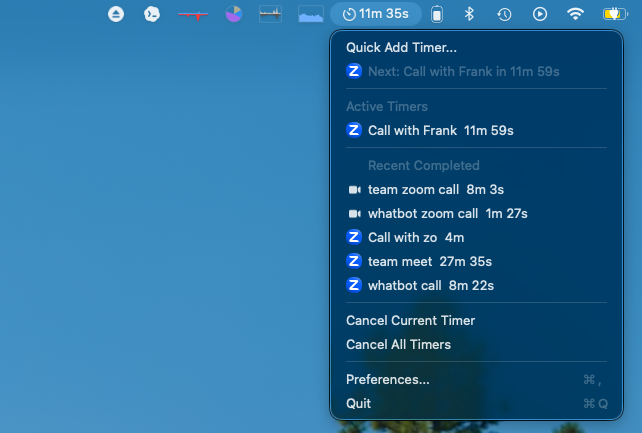
Prompt Timer — menu bar
Prompt Timer menu bar dropdown showing quick add, active timers, recent completed timers, cancel actions, preferences, and quit

the menu bar agent — active and recent timers, one click away.

type it like you'd say it
$ timer zoom with fred in 10m
⏱ 10 minutes later confetti. zoom opens. you're on time.
$ timer 25 deep work
started 25m timer: deep work
$ timer 3m check if the pasta is alive
started 3m timer: check if the pasta is alive
built for keyboard people

happens every week. probably happened to you yesterday. you're heads-down on something, the warning fires, you glance at it, and your brain just… files it. then suddenly you're scrambling for the meeting link with the camera off and your hair wrong.

so prompt timer takes the text you typed — plain english, whatever — and when the countdown fires, it opens the app you mentioned. zoom, mail, slack, browser, whatever you said. it just launches it. you're already in the meeting while the other people are still looking for the link.

plus confetti. because you showed up on time and i think that deserves confetti.
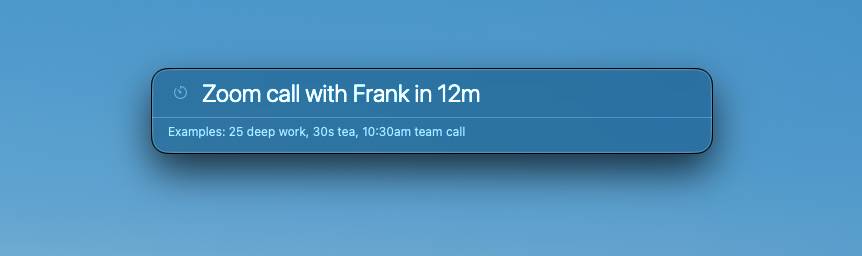
quick add — type it like you'd say it
Prompt Timer quick add panel with the prompt Zoom call with Frank in 12m

type the reminder the way you'd say it. prompt timer figures out the countdown.

what's in it
menu bar agent
active and recent timers in one place
timer cli
start, list, cancel from terminal
app detection
mention an app, it opens when time's up
natural prompts
“25 deep work”, “10am call”, “start zoom in 30m”
alfred wrapper
keyword workflow over the cli
wake handling
catches up on overdue timers after sleep
local first
no account, no cloud timer brain
if something's off
how to update?
grab the new version and drop it in applications. i'm looking into making this less manual.
something weird?
send a note to hi@beerbellypig.com with your macOS version and what you typed. i read everything.