<- back to the bar
Ejecto app icon
macOS apps/
one-click eject + sleep protection + auto-remount

Ejecto

v1.0

you will never see “Disk Not Properly Ejected” again. well, almost never. i'm working on it.

-> donate + download 8$ · soon download

minimum os requirement: macOS 13.0

Ejecto — menu bar
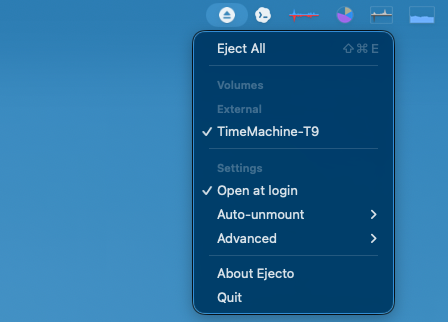
Ejecto menu bar dropdown showing eject all, managed volumes, auto-unmount, advanced options, and quit

one icon in the menu bar. one click ejects every managed drive.

the whole job, four lines
laptop plugged in. backup drive spinning. you need to go.
click the menu bar icon. drives eject. grab your laptop.
just close the lid. ejecto ejects before sleep.
back at your desk? drives remount automatically.
disk busy? ejecto retries until it cooperates.
for the disk-warning survivors

you know the routine. macbook's docked, backup drive's doing its thing, and suddenly you need to leave. so you hunt through finder, try to eject, wait, get the “Disk Not Properly Ejected” warning anyway, and feel vaguely guilty about your hard drive's feelings.

i got tired of that. ejecto sits in your menu bar. one click ejects all your managed drives. closing the lid? it tries to unmount before sleep kicks in. come back? drives remount.

it uses a privileged helper for mount and unmount because disk chores should actually work instead of politely failing in the corner.

drives ejected — safe to unplug
Ejecto managed drives menu showing drive controls and status

no warning, no guilt. it won't say a busy disk is safe to yank.

what's in it
one-click eject
click the menu bar icon, drives go
auto-eject on sleep
unmounts before sleep when possible
auto-remount
drives come back when you do
smart retry
busy volumes polled until they cooperate
mount from menu
remount without opening disk utility
privileged helper
reliable operations, no polite failures
if something's off
helper not approved?
system settings → general → login items & extensions. let the ejecto helper through. it's friendly.
disk still busy?
some app is holding a file hostage. ejecto retries, but it won't lie and say a busy disk is safe to yank.
something weird?
send a note to hi@beerbellypig.com with your macOS version, drive type, and what ejecto said.